

Measurements
Velocity Time Integral (VTI)
Trace and save Doppler Velocity Time Integral (VTI) measurements from spectral Doppler waveforms.
Velocity Time Integral (VTI) Measurements
HeartLab allows users to perform Velocity Time Integral (VTI) measurements directly on spectral Doppler waveforms within the study viewer. VTI measurements are created by tracing the Doppler spectral envelope to calculate the integrated velocity across the selected waveform.
This guide explains how to create, refine, and save VTI measurements.
Steps
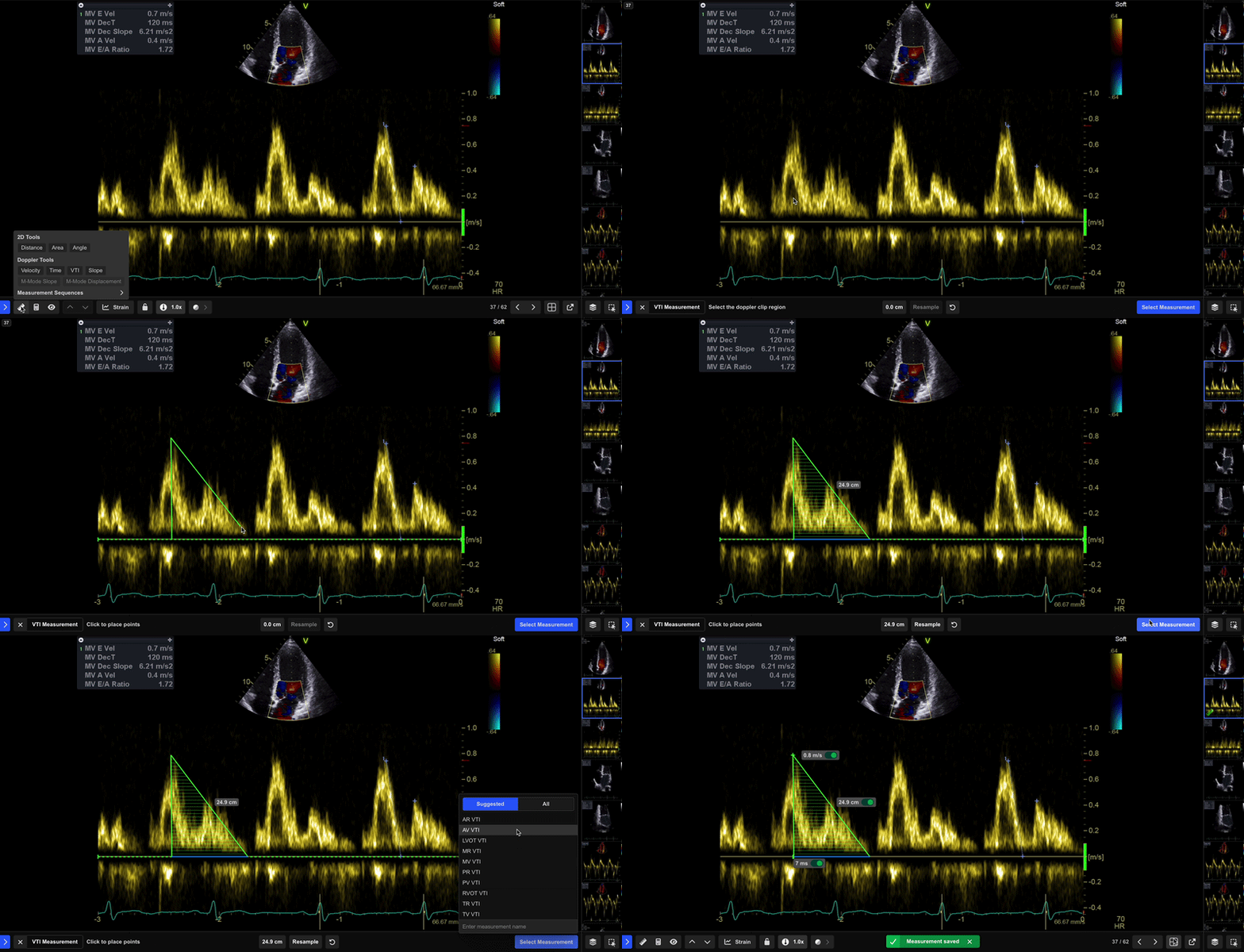
Step 1: Select the VTI Tool
- Select VTI from the Measurement Toolbar.
Doppler measurement tools are only available when viewing a recognised Doppler image.
Step 2: Define the VTI Origin
- Select the point on the waveform where the measurement should begin.
- Move the green slider to the waveform peak to define the origin point.
Step 3: Trace the Spectral Envelope
- Trace the Doppler spectral envelope using point-by-point contour tracing.
- Continue selecting points along the waveform boundary until the contour is complete.
- Double-click to complete the measurement.
Step 4: Review the Measurement
Once the contour is complete, HeartLab displays a preview of the measurement highlighted in green.
The lower pane also provides options to:
- Resample the contour
- Retake the measurement
- Save the measurement
Step 5: Save the Measurement
- Select Select Measurement or press Enter.
- In the pop-up window:
- Search, scroll, or create a measurement label
- Select the appropriate measurement type
- Optionally include related measurements
- Click Save or press Enter.
The measurement is saved to the study and the annotation remains visible on the image.
Use clearly defined Doppler envelopes and avoid tracing excessive background noise to improve measurement consistency and accuracy.
 MFR
MFR